If a button is clicked, you can use the dialogreturn variables to get to know who clicked it. You must understand what the variables stand for:
- dialoginput_title
- The title of the dialog you want to create
- dialoginput_numberofbuttons
- The number of buttons it shall have
- dialoginput_buttontext
- The text on the buttons. dialoginput_buttontext[0] is the text on the first button.
- dialoginput_buttonhotkey
- The hotkey for the buttons. dialoginput_buttonhotkey[0] is the hotkey for the first button. They should be simple one character strings, such as "a" or "1".
- dialoginput_buttonclicked
- The trigger for the buttons. dialoginput_buttonclicked[0] is the trigger that is called when the first button is clicked.
These triggers are added to the trigger queue, so the last action should be 'remove this trigger from trigger queue'.
These triggers will be called when a player clicks on a button. - dialoginput_playerswhocansee
- These are the players the dialog is shown to.
- dialogreturn_buttonindex
- The index of the clicked button. If the first button was clicked, it's 0. (2nd button -> 1 and so on)
- dialogreturn_player
- The player that clicked on the button
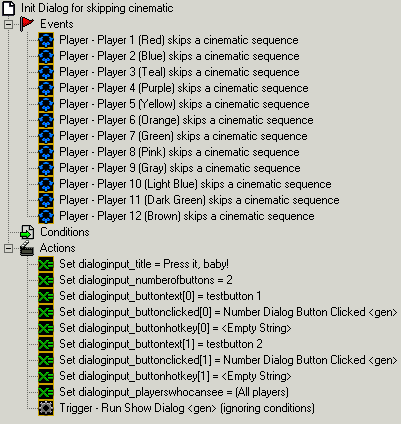
or with hotkeys and colours:
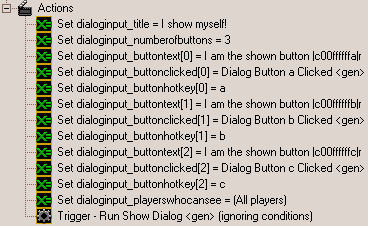
You must set all variables before calling 'Show Dialog'!
Even the hotkeys. If you don't want hotkeys, set them to an empty string.
Notice: The first button has index 0, the second has index 1, and so on.

You must delete the trigger from the trigger queue after using! Do it like shown above.